CSS Box Model
All HTML elements can be considered as boxes.
The CSS Box Model
In CSS, the term “box model” is used when talking about design and layout.
The CSS box model is essentially a box that wraps around every HTML element. It consists of: content, padding, borders and margins. The image below illustrates the box model:
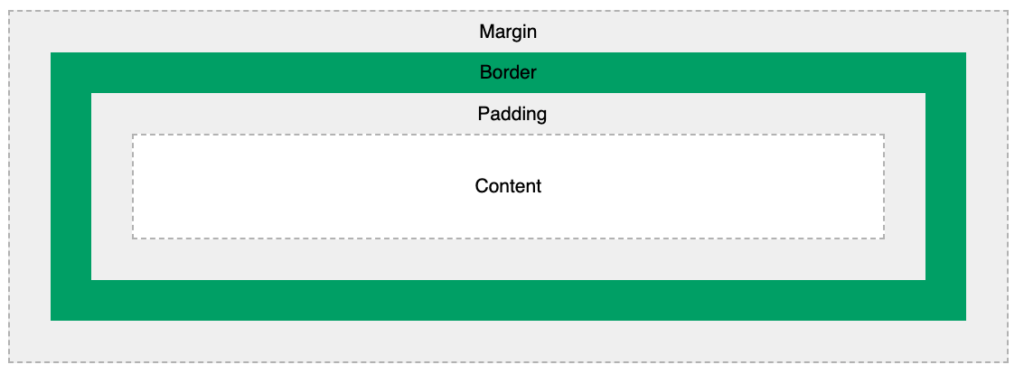
Explanation of the different parts:
- Content – The content of the box, where text and images appear
- Padding – Clears an area around the content. The padding is transparent
- Border – A border that goes around the padding and content
- Margin – Clears an area outside the border. The margin is transparent
The box model allows us to add a border around elements, and to define space between elements.
Example
Demonstration of the box model:
<!DOCTYPE html>
<html>
<head>
<style>
div {
background-color: lightgrey;
width: 300px;
border: 15px solid green;
padding: 50px;
margin: 20px;
}
</style>
</head>
<body>
<h2>Demonstrating the Box Model</h2>
<p>The CSS box model is essentially a box that wraps around every HTML element. It consists of: borders, padding, margins, and the actual content.</p>
<div>This text is the content of the box. We have added a 50px padding, 20px margin and a 15px green border. Ut enim ad minim veniam, quis nostrud exercitation ullamco laboris nisi ut aliquip ex ea commodo consequat. Duis aute irure dolor in reprehenderit in voluptate velit esse cillum dolore eu fugiat nulla pariatur. Excepteur sint occaecat cupidatat non proident, sunt in culpa qui officia deserunt mollit anim id est laborum.</div>
</body>
</html>
Width and Height of an Element
In order to set the width and height of an element correctly in all browsers, you need to know how the box model works.
Example
This <div> element will have a total width of 350px and a total height of 80px:
<!DOCTYPE html>
<html>
<head>
<style>
div {
width: 320px;
height: 50px;
padding: 10px;
border: 5px solid gray;
margin: 0;
}
</style>
</head>
<body>
<h2>Calculate the total width:</h2>
<img src=”klematis4_big.jpg” width=”350″ height=”263″ alt=”Klematis”>
<div>The picture above is 350px wide. The total width of this element is also 350px. The total height of this element is 80px.</div>
</body>
</html>
Here is the calculation:
320px (width of content area)
+ 20px (left padding + right padding)
+ 10px (left border + right border)
= 350px (total width)
50px (height of content area)
+ 20px (top padding + bottom padding)
+ 10px (top border + bottom border)
= 80px (total height)
The total width of an element should be calculated like this:
Total element width = width + left padding + right padding + left border + right border
The total height of an element should be calculated like this:
Total element height = height + top padding + bottom padding + top border + bottom border